Clutter Street: A Modern Blackletter for Designers and Crafters
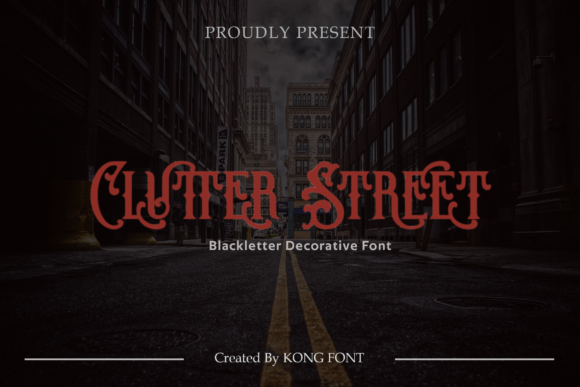
If you have ever scrolled through Pinterest or browsed Etsy, you have likely encountered that distinct, edgy aesthetic. It is bold, slightly chaotic, and undeniably eye-catching. This style often relies on blackletter fonts—typefaces inspired by medieval calligraphy but updated for contemporary design needs. Among the growing library of digital typefaces available today, Clutter Street stands out as a versatile option for creators who want to add character without sacrificing readability. Created by Kong Font Studio and available via Creative Fabrica, this font bridges the gap between historical elegance and modern streetwear vibes.
For designers, crafters, and small business owners, choosing the right typeface is rarely just about picking something that looks "cool." It is about communication. Does the font match the brand voice? Is it legible at small sizes? Can it be used in commercial projects? Clutter Street answers these questions with a design that feels both mysterious and accessible. Whether you are designing a logo for a coffee shop, cutting vinyl decals for a t-shirt, or creating a digital invitation, understanding how to leverage a font like Clutter Street can elevate your work from amateur to professional.
Understanding the Aesthetic: What Makes Clutter Street Unique?
Blackletter fonts have a long history, originating in Western Europe during the Middle Ages. Traditionally, they were dense, heavy, and difficult to read at scale. However, modern interpretations like Clutter Street have streamlined these elements. The term "Clutter" in the name suggests a certain texture or density, while "Street" implies an urban, contemporary edge. The result is a typeface that retains the dramatic flair of gothic script but strips away the excessive complexity that makes older styles impractical for everyday use.
This font is particularly appealing because it avoids the cliché of looking like a Halloween costume or a generic tattoo parlor sign. Instead, it offers a sophisticated darkness that works well in minimalist designs where contrast is key. The strokes are clean enough to render sharply in vector software, which is crucial for users of cutting machines like Silhouette or Cricut. When you download a font from platforms like Creative Fabrica, you are often looking for assets that are ready to use immediately. Clutter Street fits this mold perfectly, offering a unique visual identity that does not require extensive tweaking to look polished.
Real-World Applications for Crafters and Makers
One of the primary markets for fonts like Clutter Street is the maker community. If you own a vinyl cutter, you know that the success of your project often depends on the intricacy of the design. Fine details can break during weeding (the process of removing excess vinyl), so clarity is paramount. Clutter Street’s structure allows for intricate designs that hold up well under pressure.
- T-Shirt and Apparel Design: Use Clutter Street for band tees, skate brands, or urban fashion lines. The font’s ruggedness pairs well with distressed textures or bold graphic elements.
- Home Decor and Wall Art: Create motivational quotes or modern abstract art pieces. The font works beautifully in monochrome palettes, such as black text on white canvas or gold foil on matte black backgrounds.
- Stickers and Decals: For laptop stickers or car decals, the high contrast of blackletter ensures visibility even at smaller sizes. It adds a layer of personality to otherwise plain surfaces.
Crafters should also consider the versatility of the font across different materials. Because Clutter Street is compatible with standard design tools, you can experiment with heat transfer vinyl (HTV) for fabric or adhesive vinyl for hard surfaces. The font’s consistency ensures that whether you are printing a single sticker or a batch of fifty, the output remains uniform.
Professional Use Cases for Digital Designers
Beyond physical crafts, Clutter Street has significant utility in the digital realm. Graphic designers working on branding projects often struggle to find fonts that convey authority without feeling outdated. This is where the modern twist of Clutter Street becomes valuable. It can serve as a display font for headlines, logos, or packaging designs where impact is more important than body text.
Consider a scenario where a local brewery wants to rebrand. They might choose a dark, moody aesthetic to reflect their stout beers. Clutter Street could be used for the brewery’s name on labels, providing a sense of heritage and craftsmanship. Pairing it with a clean sans-serif font for the descriptive text creates a balanced composition that guides the viewer’s eye effectively.
Similarly, marketers and bloggers can use this font to create featured images for social media posts. In a feed dominated by pastel colors and soft aesthetics, a bold blackletter headline can stop the scroll. It signals confidence and strength, making it ideal for topics related to finance, technology, or lifestyle advice that requires a no-nonsense tone. Just remember to use it sparingly; as a display font, its power lies in its rarity within a layout.
Integration with Popular Design Tools
One of the most practical aspects of Clutter Street is its compatibility with industry-standard software. Whether you are a seasoned Photoshop user or a beginner using Silhouette Design Studio, the installation and usage process is straightforward. For digital designers, installing the font into your operating system makes it instantly available in Adobe Creative Cloud applications. You can then manipulate the text using layers, effects, and blending modes to create complex compositions.
For those using Silhouette or Cricut, the font must be installed on your computer before it appears in the design software. Once installed, you can convert the text to paths or shapes, allowing for further customization. This is particularly useful if you plan to add decorative elements around the letters or modify the baseline. The fact that Clutter Street is designed with clean vectors means that when you cut it, the edges will be smooth, reducing the need for post-production touch-ups.
- Installation: Download the font file from Creative Fabrica and unzip it.
- System Integration: Right-click the .ttf or .otf file and select "Install."
- Software Access: Open your preferred tool (Photoshop, Illustrator, Silhouette, etc.) and select Clutter Street from the font dropdown menu.
- Customization: Adjust tracking, leading, and color to fit your specific design needs.
Important Considerations Before Using Clutter Street
While Clutter Street is a powerful tool, it is not a one-size-fits-all solution. Blackletter fonts are inherently dominant, meaning they can easily overwhelm other elements in a design. To avoid this, follow the principle of balance. Use Clutter Street for titles, headers, or short phrases, and pair it with simple, highly readable fonts for any accompanying body text. Sans-serif or light serif fonts work best as counterparts, as they provide visual relief from the heavy weight of the blackletter.
Another critical consideration is licensing. Fonts are intellectual property, and using them without proper permission can lead to legal issues, especially for commercial projects. Since Clutter Street is distributed through Creative Fabrica, ensure you purchase the correct license for your intended use. Personal use licenses may differ significantly from commercial licenses, which allow you to sell products created with the font. Always review the terms provided by Kong Font Studio to stay compliant.
Additionally, think about accessibility. While blackletter fonts are visually striking, they can be difficult for some readers to parse, particularly those with dyslexia or visual impairments. Avoid using Clutter Street for essential information like phone numbers, addresses, or instructions. Reserve it for decorative purposes where the goal is aesthetic appeal rather than functional communication.
Conclusion
Clutter Street represents a thoughtful evolution of the blackletter genre, tailored for the demands of modern design. Its blend of mystery and clarity makes it suitable for a wide range of applications, from physical crafts to digital marketing. By understanding its strengths and limitations, you can integrate it into your workflow in ways that enhance your projects rather than distract from them. Whether you are a hobbyist making gifts for friends or a professional building a brand identity, this font offers a distinctive voice that speaks volumes. Explore its potential, respect its visual weight, and let it bring a touch of timeless edge to your creative endeavors.